Sometimes Modernization Means Removing Technology
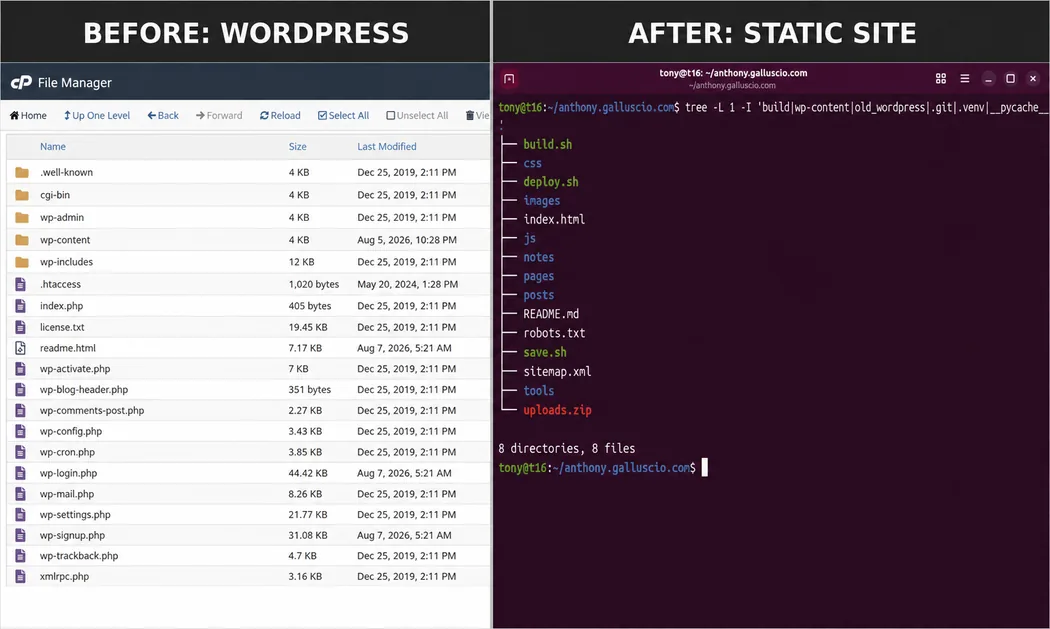
After a four-and-a-half-year absence, I decided to start writing on my personal blog again. I dusted off the WordPress site I had been using and quickly discovered that getting back to writing meant first getting back into the business of maintaining WordPress.
That wasn't what I wanted to do.
Two days later, WordPress was gone.
How I Got Here
There was nothing fundamentally wrong with my old website. In fact, one of my requirements for its replacement was that the new site look almost exactly like it.
The problem was everything behind it.
I hadn't actively maintained the site while I wasn't blogging. WordPress itself and many of its plugins needed attention. Some things no longer worked correctly. The domain and hosting had also ended up being managed in different places over the years, which added another layer I didn't need.
More importantly, the site had become considerably more complicated than the job it was doing.
This is a personal blog. I write posts. I have a few static pages. I display photographs and occasionally other media. I want people to be able to browse posts by category and date. I want the site to work well on a phone and load quickly.
WordPress can certainly do all of those things. But as I started thinking about features I wanted to add, the answer repeatedly seemed to be another plugin, another component, or another layer to maintain.
I found myself asking a very basic engineering question:
What does this site actually need?
Starting With the Requirements
Once I stopped thinking in terms of "replacing WordPress" and started thinking about the requirements of the website, the problem became much simpler.
I needed to preserve every existing post and page. I wanted the existing URLs to continue working so old links and search engine results wouldn't break. I needed to preserve the photographs and other media from the old site. I wanted the appearance to remain familiar.
I also wanted responsive images, responsive tables, pagination, monthly archives, a posting calendar, categories, a sticky sidebar on larger screens, and a responsive mobile layout.
What I did not need was a database, an administrative application running on the server, PHP generating pages on every request, or a collection of plugins.
For this particular site, I couldn't identify a good reason for JavaScript to be involved in displaying the blog at all. The one exception is the contact page, where a small amount of JavaScript is useful.
So we didn't use it anywhere else.
Building the Replacement
I worked on the migration with my personal AI assistant, which I call Navigator.
I think that distinction is worth mentioning because there is a right way and a wrong way to use AI for this kind of work.
I didn't tell an AI to "build me a website" and then blindly deploy whatever it produced. Navigator and I worked through the existing site, its content, its behavior, and its requirements incrementally. We made a change, built the site, checked the result, and then moved to the next thing.
One of our working rules became particularly important: no regression.
Once something worked, we treated it as something that needed to be preserved. Before changing a core file, we worked from the current version of that file rather than reconstructing it from memory or generating a replacement based on what we thought it contained.
AI was extremely useful in this process, but I remained responsible for the architecture, the decisions, the testing, and ultimately what went into production.
To me, that is responsible use of AI. It is a very capable engineering partner, not a substitute for engineering judgment.
What Replaced WordPress?
The replacement is remarkably small.
Posts are ordinary, human-readable files. Each has a small metadata section containing things such as its title, date, URL slug, category, SEO information, and featured image. The body of the post is HTML.
Pages work essentially the same way.
A Python build program reads those source files and generates the complete static website. It builds the homepage, individual posts and pages, pagination, monthly archives, category pages, the posting calendar, sidebar, and other shared pieces of the site.
CSS handles the presentation and responsive behavior.
Historical WordPress media remains at its old /wp-content/uploads/ paths so existing URLs continue to work. New media goes into a simple /images/ directory. That lets me preserve compatibility with the old site without continuing to organize new content as though WordPress were still there.
The result that gets deployed is just a static website.
No WordPress.
No database.
No PHP application.
And essentially no client-side JavaScript.
I Didn't Want Simplicity to Mean Sloppy
One thing I did not want was to trade the controls of a content management system for a directory full of files that I could accidentally overwrite or lose.
The entire source site is therefore kept in Git.
That gives me straightforward version control over the posts, pages, CSS, build software, and other source files. If I make a mistake, I have history. If I want to know what changed, I can see exactly what changed.
I also built the workflow around three simple commands: build, save, and deploy.
Building creates the complete site from the source files.
Saving records the current work in Git.
Deploying publishes the generated site to the web server.
There is an additional safety rule that I particularly like: the deployment process refuses to deploy a dirty repository.
If I have changed something and haven't committed it, deployment stops.
That means the website in production should always correspond to a known version in Git. I can't casually make a change, forget to save it, and push an unrecorded state into production.
It's a very small control, but it gives me something I value much more than another layer of software: confidence that I know exactly what I deployed.
The Migration
The migration took two days.
We exported the WordPress content and media, converted the posts and pages into the new source format, reproduced the existing site design, and then worked through the details.
We preserved the existing URLs. We restored and audited the media. We added image optimization. We made images and tables responsive. We tested different browser sizes and mobile layouts. We added pagination, categories, monthly archives, the posting calendar, a sticky sidebar, and a copyright footer.
The old WordPress installation is still preserved on the server for now, but it is no longer serving the website.
The interesting part is that most visitors probably wouldn't immediately realize anything changed.
That was intentional.
I wasn't trying to redesign my blog. I was trying to modernize how it works.
The Result
The new site looks like my old site.
It is also considerably faster, easier for me to understand, easier for me to modify, and has capabilities the old site didn't have.
Most importantly, there is very little running that needs to be maintained.
That's the part of this project I find most interesting.
In technology, we often treat modernization as an additive process. We modernize something by adding a framework, a service, an abstraction layer, a platform, or another piece of software.
Sometimes those things are exactly what a system needs.
But sometimes the better engineering decision is to look at what the system is actually required to do and start removing things.
My personal blog did not need a better-maintained WordPress installation.
It didn't need more plugins.
It didn't need a new framework.
It needed HTML, CSS, a small build system, Git, and a web server.
Sometimes modernization means removing technology.